xgaming.hosting
Java · Bedrock · Modded

Minecraft Server Hosting

12+ server software options including Paper, Forge, Fabric, NeoForge, Velocity, and Bedrock. One-click access to 1,500+ modpacks from CurseForge, Modrinth, and FTB. Unlimited slots, instant version switching, and Ryzen 9 CPUs optimized for both vanilla and heavily modded servers.

🎉 Chaos Cubed Update (26.2) dropping June 16 — day-one support with Sulfur Caves, Sulfur Cubes, and new mechanics

  • ✓ Instant 60s setup
  • ✓ DDoS protection
  • ✓ Free subdomain
  • ✓ Daily backups
  • ✓ Ryzen 9 CPUs
  • ✓ Modpack installer
  • ✓ Chaos Cubed ready (June 16)

Minecraft plans

RAM-based pricing. All plans include unlimited slots, SSD storage, and DDoS protection.

30% off first monthcode XGAMEON
Starter
200% CPU · 35 GB NVMe
$7$10
first month · then $10/mo
RAM: 4 GB
  • Ryzen 9 cores
  • DDoS protection
  • Modern control panel
  • Daily backups
Order now
Novice
200% CPU · 40 GB NVMe
$10.50$15
first month · then $15/mo
RAM: 6 GB
  • Ryzen 9 cores
  • DDoS protection
  • Scheduled tasks
  • Daily backups
  • Free subdomain
Order now
Rookie
300% CPU · 60 GB NVMe
$14$20
first month · then $20/mo
RAM: 8 GB
  • Ryzen 9 cores
  • DDoS protection
  • Scheduled tasks
  • Daily backups
  • Free subdomain
  • Mod installer
Order now
Most Popular
Pro
400% CPU · 80 GB NVMe
$21$30
first month · then $30/mo
RAM: 12 GB
  • Ryzen 9 priority CPU
  • DDoS protection
  • Scheduled tasks
  • Hourly backups
  • Free subdomain
  • Mod installer
Order now
ProMax
600% CPU · 100 GB NVMe
$31.50$45
first month · then $45/mo
RAM: 16 GB
  • Ryzen 9 priority CPU
  • DDoS protection
  • Hourly backups, 7-day retention
  • Priority support
  • Free subdomain
  • Database add-on ready
Order now
Ultimate
800% CPU · 120 GB NVMe
$42$60
first month · then $60/mo
RAM: 24 GB
  • Dedicated CPU share
  • Hardware DDoS mitigation
  • Hourly backups, 14-day retention
  • Priority support
  • Dedicated IPv4 (optional)
  • Cluster-ready
Order now
Control Panel

Run your server without the terminal

Our modified Pterodactyl panel gives you everything you need to manage a dedicated game server from any device.

panel.xgamingserver.com / dashboard
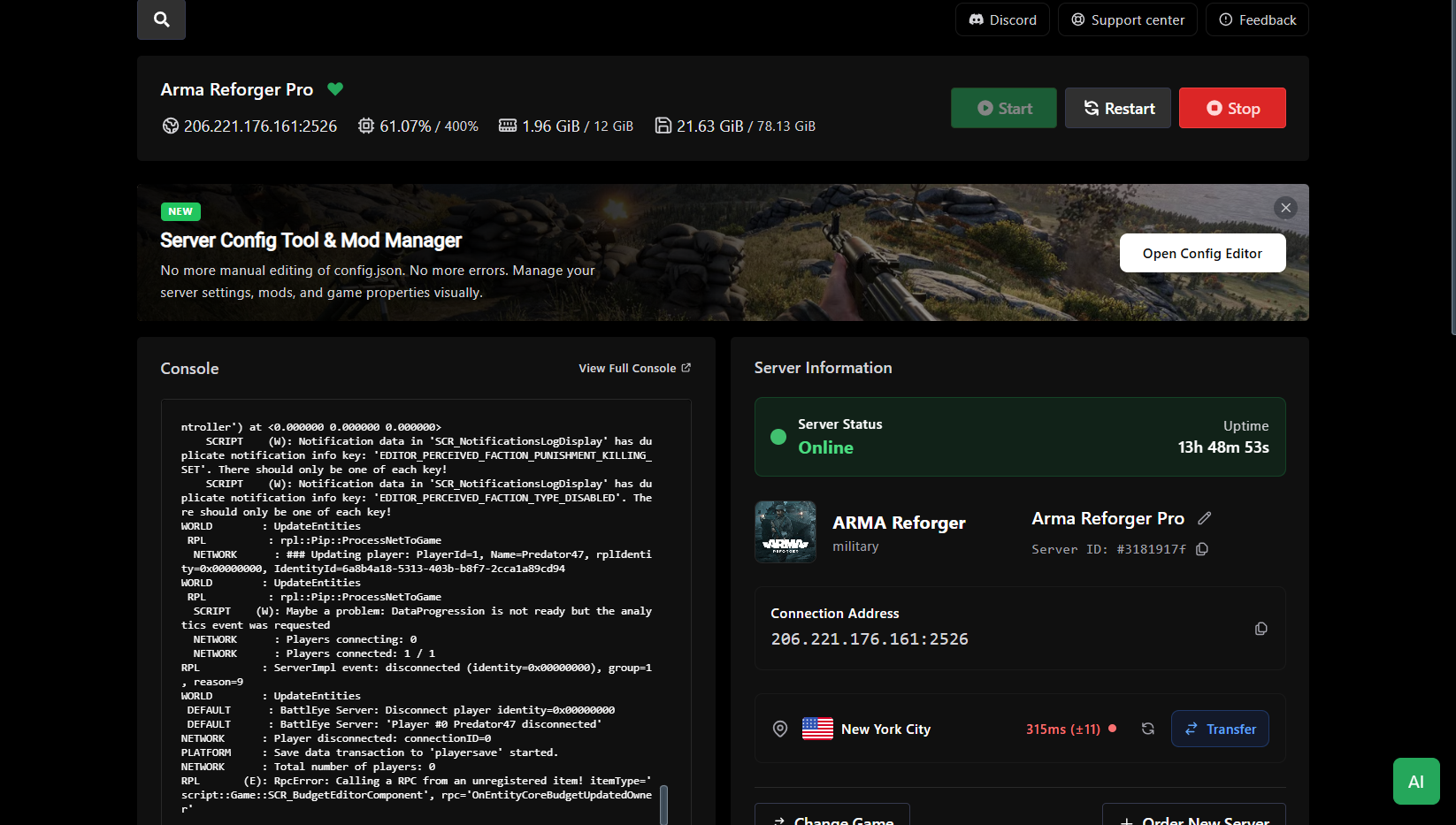
Dashboard — XGamingServer control panel screenshot

A dashboard built for game server admins

Every server you run, on one screen. Live CPU, RAM, network, and player counts update in real time — no refresh, no terminal, no hunting through tabs. Start, stop, or restart any instance with a single click.

  • Live CPU, RAM, disk, and network graphs
  • Player counts and uptime per server
  • One-click start, stop, restart, or kill
  • Status badges: online, offline, starting, crashed
Locations

Low ping, anywhere

13 data centers across 5 continents. Pick the location closest to your players at checkout — switch anytime.

North America4
  • New YorkUnited States
  • DallasUnited States
  • Los AngelesUnited States
  • MontrealCanada
Europe5
  • LondonUnited Kingdom
  • FrankfurtGermany
  • AmsterdamNetherlands
  • WarsawPoland
  • StockholmSweden
Asia2
  • SingaporeSingapore
  • TokyoJapan
Oceania1
  • SydneyAustralia
South America1
  • São PauloBrazil
About the game

About Minecraft

Minecraft is the best-selling video game of all time with over 300 million copies sold, and the most modded game ever created. Since its 2011 release, Minecraft has evolved from a simple sandbox indie project into a massive ecosystem spanning Java Edition and Bedrock Edition, thousands of plugins, and modpacks containing hundreds of mods each.

The game supports cross-platform play across PC, mobile devices (iOS/Android), Xbox, PlayStation, and Nintendo Switch. With the Chaos Cubed Update (26.2) launching June 16, 2026, Minecraft continues evolving with new Sulfur Caves biomes, Sulfur Cubes, expanded redstone mechanics, and quality-of-life improvements — all supported on our servers from day one.

Whether you're hosting a family SMP, a public Paper server with anti-cheat and Bedrock crossplay, or a full Forge network running ATM10, the same panel and the same hardware handle it.

12 loaders
Server software
1,500+
Modpacks
15,000+
Servers hosted
< 60s
Avg. setup time
1,500+ Modpacks

One-Click Modpack Installation

Our Minecraft server hosting provides access to 1,500+ one-click modpacks from CurseForge, Modrinth, FTB, ATLauncher, and Technic. Popular modpacks include All the Mods 10 (ATM10) with 300+ mods adding technology, magic, and exploration; RLCraft transforming Minecraft into a brutal survival experience; Better Minecraft enhancing vanilla gameplay with 200+ quality mods; and Vault Hunters adding RPG dungeon mechanics.

The panel's integrated modpack browser lets you search, preview mod lists, check system requirements, and install with one click — no manual file management required.

ATM10
300+ mods, tech + magic
RLCraft
Hardcore survival
Better MC
200+ quality mods
Cobblemon
Pokémon in Minecraft
12 Server Options

Choose Your Server Software

We support 12 server software options: Vanilla, Paper, Purpur, Spigot, Forge, NeoForge, Fabric, Quilt, Folia, Velocity, BungeeCord, and Waterfall. Switch between any version with one click — no reinstall required.

Paper / Purpur / Spigot
Optimized vanilla servers supporting plugins (EssentialsX, WorldEdit, LuckPerms) but not client mods.
Forge / NeoForge
Support client-side mods (.jar files) for modded gameplay. Required for modpacks like ATM10.
Fabric / Quilt
Lightweight modding frameworks with better performance than Forge for modern mods.
Hardware & Performance

Built for Modded Minecraft

Running a Minecraft server successfully requires understanding hardware requirements. Vanilla servers with 5-10 players run smoothly on 2-4GB RAM. Light modpacks need 6-8GB. Medium modpacks require 10-12GB. Heavy modpacks (ATM10, RLCraft with shaders) demand 16-24GB RAM.

Our Ryzen 9 7950X and 9950X CPUs deliver 5.7GHz+ boost clocks for exceptional single-thread performance, keeping TPS stable at 20 even during intensive modded gameplay. NVMe SSD storage delivers 10x faster chunk loading compared to traditional hosting.

Vanilla (5-10 players)
2-4GB
Light Modpacks (30-50 mods)
6-8GB
Heavy Modpacks (ATM10, RLCraft)
16-24GB
Testimonials

What Minecraft admins say

Switched our 80-slot ATM10 pack from a competitor. TPS went from 12 to a rock-solid 20 on the same RAM.
EnderLord_47
ATM10 server owner
The modpack installer supports every CurseForge pack I've tried. No more manual jar juggling.
Priya K.
SMP owner
Bedrock + Java crossplay via GeyserMC worked out of the box. Not a single ticket needed.
Markus B.
Family SMP
Chunky pre-generated my 20k x 20k world in under two hours. Players joined to a lag-free overworld.
DragonSlayer99
Minecraft admin
Velocity network setup took me 15 minutes. The panel even has a pre-configured template.
Oliver H.
Network operator
Automatic daily backups saved us when a plugin update corrupted level.dat. One click restore.
Aria L.
SMP admin
FAQs

Minecraft hosting FAQs

Is the Chaos Cubed Update (26.2) supported?+

Yes — the Chaos Cubed update releasing June 16, 2026 will be supported on day one. All servers automatically update to 26.2 with full support for Sulfur Caves, Sulfur Cubes, new redstone mechanics, and all Chaos Cubed features. Simply restart your server after the update drops.

How many modpacks can I install?+

Over 1,500+ modpacks available via one-click installation from CurseForge, Modrinth, FTB, ATLauncher, and Technic. Popular packs include All the Mods 10 (ATM10), RLCraft, Better Minecraft, Vault Hunters, Create: Above & Beyond, Cobblemon, Prominence II, and Medieval Minecraft. Search by name or browse categories directly in the panel.

Which Minecraft versions and loaders are supported?+

Every Java Edition version from 1.8 through 1.21.5+ (including snapshots and Chaos Cubed 26.2), plus all Bedrock Dedicated Server versions. 12+ server software options: Vanilla, Paper, Purpur, Spigot, Forge, NeoForge, Fabric, Quilt, Folia, Velocity, BungeeCord, and Waterfall. Switch between any version or loader with one click—no reinstall required.

Can I run multiple Minecraft servers on one plan?+

Yes. Create proxy networks with Velocity or BungeeCord connecting multiple sub-servers (lobby, survival, creative, minigames) under one IP. Iron plan and above include proxy templates and split-server configurations. Perfect for server networks with 100+ concurrent players across multiple worlds.

Do you support Bedrock Edition?+

Yes. We offer native Bedrock Dedicated Server, PocketMine-MP, and NukkitX. For crossplay we pre-install GeyserMC and Floodgate on any Paper or Purpur template.

What's 'unlimited slots'?+

Starter plans have no hardcoded slot cap — performance is the real limit. Choose enough RAM and CPU for the population you expect. The guidance numbers on each plan are realistic targets.

Can I run a server network (Bungee / Velocity)?+

Yes. Create multiple servers under the same billing account, configure them as subservers in your proxy, and point a single subdomain at the proxy. Iron plan and above include proxy-ready templates.

Do you offer dedicated IPs?+

Diamond includes a custom port-free subdomain. Netherite includes a dedicated IPv4 so players can connect without a port. Additional IPs are $3/month on any plan.

What's the difference between Paper, Spigot, and Forge?+

Paper and Spigot are optimized Vanilla servers supporting plugins (like EssentialsX, WorldEdit, LuckPerms) but not mods. Forge and NeoForge support client-side mods (.jar files) for modded gameplay but limited plugin compatibility. Fabric is lightweight modding with better performance than Forge. Hybrid servers (Magma, Mohist) support both but with stability trade-offs.

Can I customize server.properties settings?+

Yes. The panel includes a visual editor for all server.properties values: difficulty, game mode, spawn protection, max players, view distance, simulation distance, PVP toggle, command blocks, and spawn limits. Advanced users get full FTP/SFTP access for manual config editing.

Will my server lag with lots of mods?+

RAM is usually the bottleneck for modded Minecraft, but single-thread CPU performance matters just as much. Every node runs Ryzen 9 7950X or 9950X — among the fastest gaming CPUs available with 5.7GHz+ boost clocks. ATM10 with 300+ mods, shaders, and 10+ players runs smoothly on 12-16GB plans. We also pre-tune JVM flags (G1GC, Aikar's flags) per modpack for optimal garbage collection.

How do backups work?+

Automated backups on all plans: daily snapshots on Dirt/Iron, hourly on Diamond/Netherite. Restore to any backup point from the panel with one click. Backups include world files, plugins, configs, and player data—stored on separate infrastructure in the same region with 7-30 day retention depending on plan.

Can I install custom plugins or datapacks?+

Yes. Full FTP/SFTP and panel file manager access. Upload .jar plugins to /plugins (Paper/Spigot), datapacks to /world/datapacks, or resource packs to the root. Popular plugins like EssentialsX, Vault, LuckPerms, WorldGuard, and GriefPrevention install via the panel's plugin library.

How do I install All the Mods 10 (ATM10)?+

ATM10 installs with one click from the panel's modpack browser. Search 'All the Mods 10' in CurseForge integration, click Install, select server version (1.21.1), and the panel auto-downloads 300+ mods, configs, and dependencies. Recommended: 12-16GB RAM for 5-10 players, 20-24GB for 10-20 players. JVM flags auto-optimized for ATM10's heavy modpack.

How do I enable Bedrock and Java crossplay?+

Install GeyserMC + Floodgate plugins on Paper or Purpur servers. The panel's Crossplay template pre-installs both, auto-configures ports (Java 25565, Bedrock 19132), and sets authentication. Bedrock players (Xbox, PlayStation, Switch, Mobile, Windows 10/11) connect to the same server as Java players with full gameplay compatibility.

How do I add operators (OP) or admins?+

Via console: type 'op <username>' and press Enter. Via panel: navigate to Console tab, enter command, or use the Players tab to promote users to operator with permission level (1-4). Level 4 grants full admin access. Configure op-permission-level in server.properties to set default operator powers.

How do I whitelist my Minecraft server?+

Enable whitelist in server.properties via the visual editor or set 'white-list=true'. Add players via console: 'whitelist add <username>'. Bulk import whitelist.json via FTP. The panel's Whitelist tab shows all whitelisted players and allows add/remove with one click. Whitelisting prevents non-approved players from joining.

Can I use shaders and resource packs on my server?+

Shaders are client-side only (players install Optifine/Iris locally). Resource packs can be server-enforced: upload .zip to server root, add 'resource-pack=<URL>' to server.properties. The panel's Resource Pack tab auto-hosts packs and generates URLs. Force players to download with 'require-resource-pack=true'.

How much RAM do I need for modpacks?+

Vanilla: 2-4GB for 5-10 players. Light modpacks (30-50 mods): 6-8GB. Medium modpacks (100-150 mods like Create: Above & Beyond): 10-12GB. Heavy modpacks (200-300+ mods like ATM10, RLCraft with shaders): 16-24GB. Per-player overhead: add ~500MB-1GB RAM per additional player beyond 10.

Related Game Servers

Explore other popular game server hosting options